Taking payment
What this is for
Turning a running order into a settled one.
Bill first, then pay
Two separate steps, and they exist separately because a table asks for the bill some minutes before they hand over a card.
- Bill & Print raises the bill and prints it for the table. No money has moved; the order shows Billed.
- Bill & Pay raises the bill and goes straight to payment.
For counter service where both happen at once, KOT, Bill, Print & Pay does the lot.
Taking the money
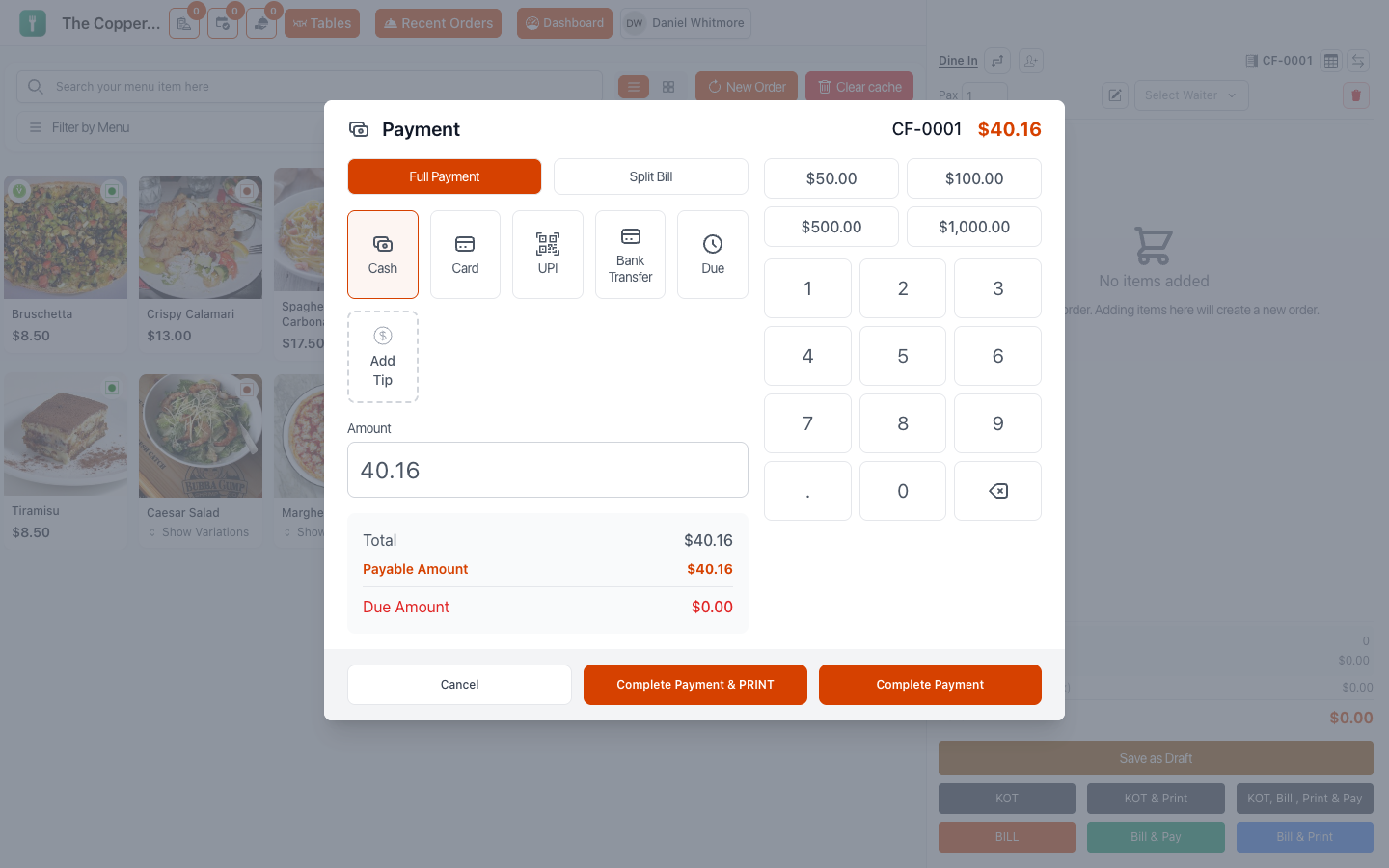
Select Add Payment and choose a Payment Method:
| Method | Notes |
|---|---|
| Cash | Enter what the guest handed over; Restodesk works out the change. |
| Card | Recorded here. Take the money on your card terminal. |
| UPI | Where you accept it. |
| Bank Transfer | For invoiced or account customers. |
| Other | Anything else you've configured. |
Then confirm. The order moves to Paid.
Cash and change
Enter the amount tendered. Amount to be returned shows the change to give.
Enter what they actually handed you, not the bill amount. Typing the exact total to save a step is how a till ends up counting correctly on screen and wrongly in the drawer.
Card
Restodesk records that the payment was by card. Unless you've connected a payment gateway, the money itself moves through your own card terminal — the two are separate, and the terminal is the one that has to approve.
Take the payment on the terminal first, then record it here. A declined card recorded as paid is a bill nobody chases.
A Transaction ID can be recorded, which makes reconciling a day's card takings possible rather than approximate.
Part payment and money owed
Not everything is settled in one go.
- Payment Due means the order is owed. It shows on the order and in your due-payments reporting until it's cleared.
- Pay Later leaves an order unpaid deliberately — account customers, staff meals, a table settling at the end of the week.
- Remaining shows what's still outstanding when a payment covers only part of the bill.
An order with payment due can't have items added or removed. Collect the payment first; extra food goes on a new order.
Tips
Add Tip at payment time. Suggested percentages or a custom amount, with the current total and the new total both shown before you confirm.
See Discounts, taxes and charges.
Splits
Several people paying separately is its own workflow — see Split, merge and hold. Each split takes its own payment method, and the order closes when the last one is settled.
Online payments
If a guest ordered through your customer site, they may have paid online already. Those orders arrive marked paid, and you take nothing at the till.
Where you accept offline payment for online orders — a bank transfer with a receipt uploaded — the order sits at Payment Verification until someone checks it. Then either Confirm Payment or Report Unpaid.
Check the money actually arrived before confirming. That status exists precisely because the customer's word isn't proof.
The receipt
Printing happens at payment, or any time afterwards from the order.
What goes on it — logo, restaurant name, branch address, table number, waiter, guest count, tax numbers, payment details — is configured under Settings › Receipt. See Receipts and printers.
Closing the order
Paid isn't the same as finished. A dine-in order stays Running on the floor screen until it's Completed, because the guests are still sitting there.
Mark it completed when the table actually clears. That's what frees the table and what your sales reports count.
Good to know
- You cannot modify a paid order. Anything extra is a new order. Anything wrong is a refund — see Refunds and cancellations.
- Cancelling an order deletes its payments. Restodesk warns you, and it can't be undone.
- A cash drawer can be set to open automatically when a receipt prints — Settings › Printers.
- Split payments and some online methods need a connection. See When the internet drops.