QR codes for tables
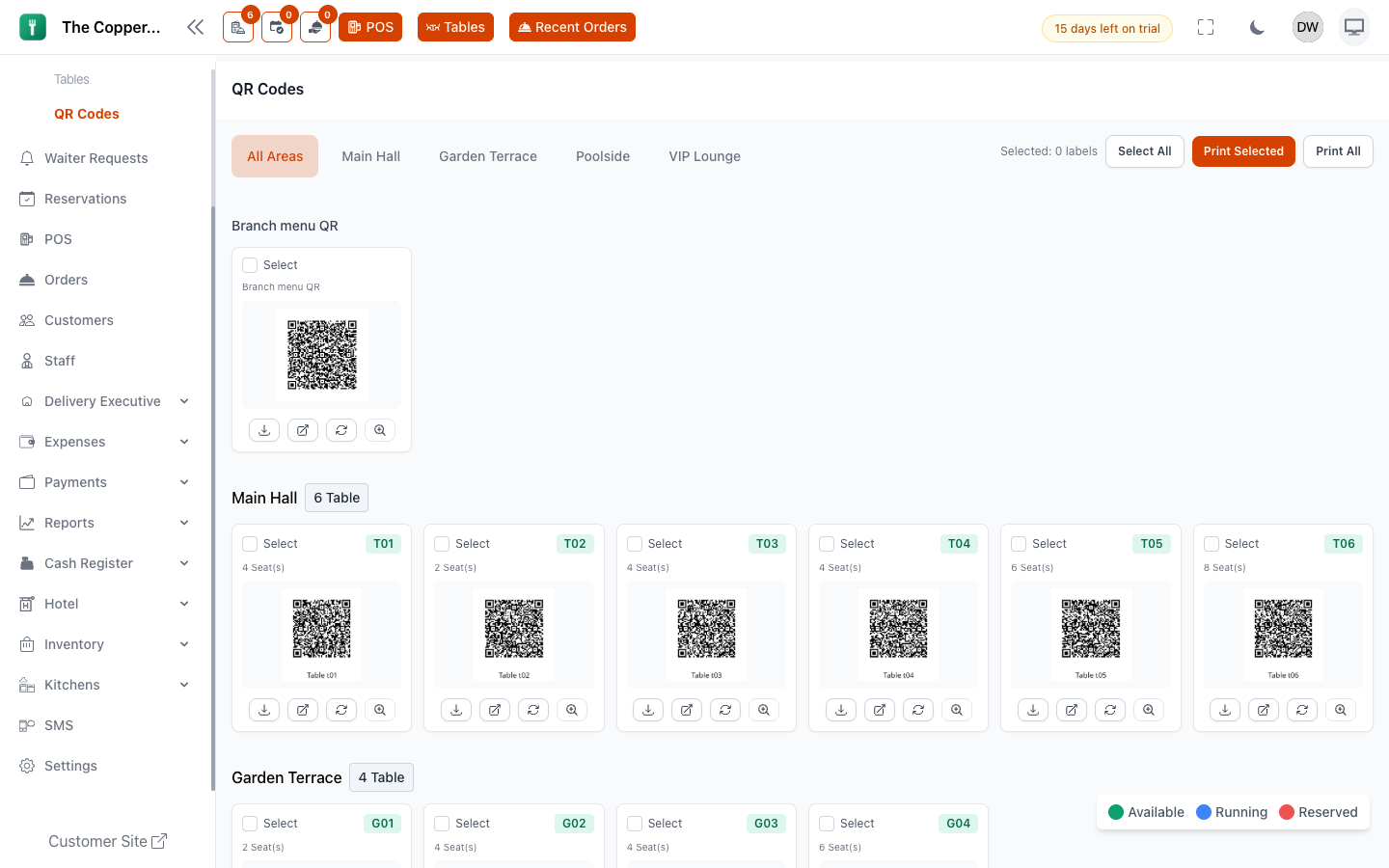
What this is for
A QR code on the table takes a guest to your menu on their own phone — already knowing which table they're sitting at. Depending on your settings they can browse, order, or call a waiter without anyone walking over.
There are two kinds:
- Table QR — one per table. Carries the table with it, so an order arrives already assigned.
- Branch menu QR — one for the whole branch. Shows the menu but knows nothing about where the guest is sitting. Good for a window sticker, a takeaway bag or a flyer.
Generating them
- Go to Tables › QR Codes.
- Select Generate QR Code for a table, or generate for all of them at once.
- Download or print.
Each code is generated from the table you created in Tables and seating, so add your tables first.
Printing
You rarely want one at a time. On the QR Codes screen:
- Tick the tables you want, then Print Selected — the counter shows how many labels you've picked.
- Or Print All for the whole branch.
- Unselect All clears the selection.
The printable sheet lays the codes out as labels with the table code on each, so they can be cut and stuck straight onto tables.
Putting them on the table
- Print bigger than feels necessary. A phone camera at arm's length across a laid table needs more than a postage stamp.
- Laminate, or use a stand. These live on eating surfaces.
- Keep the table code visible next to the code. When a guest phones about an order, the code on the table is what they'll read out.
- Test one before printing sixty. Scan it with a normal phone camera, in your actual lighting.
Regenerating a code
Generating a new QR code for a table invalidates the old one. Any printed label for that table stops working and must be replaced.
That's a feature, not a nuisance — it's how you retire a code that leaked, was photographed, or got stuck to the wrong table. But don't regenerate casually across a whole restaurant unless you're ready to reprint.
Good to know
- Codes are per table and per branch. A second branch generates its own set; codes from one branch don't work in another.
- Renaming a table changes what prints on the label. Reprint after a rename.
- What a guest can actually do after scanning — browse only, order, pay — comes from your customer site settings, not from the code itself.
- If nothing happens when a guest scans, see Why can't I see this screen?